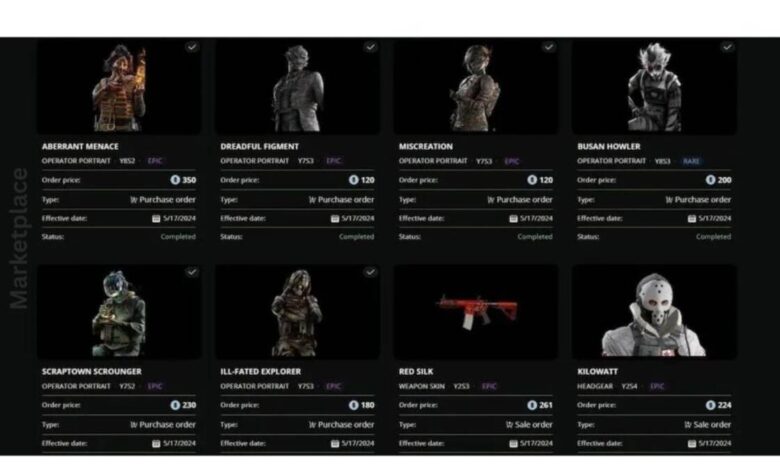
If you’ve been playing Rainbow Six Siege for a while, you probably know how exciting it can be to collect skins, charms, and other cosmetics for your operators and weapons. But have you ever thought about buying or selling those cosmetics? That’s where the R6 Marketplace comes in!
The R6 Marketplace is Ubisoft’s official platform for trading skins, headgear, weapon skins, and charms using R6 Credits. It’s a safe, fun, and easy way to make your in-game collection even better, while also earning some credits in the process. In this guide, we’ll take you through everything you need to know to get started on the R6 Marketplace, from buying and selling to using the best strategies to maximize your profits.
So, whether you’re looking to grab that rare Black Ice skin or sell some duplicates for a quick profit, this guide will help you master the R6 Marketplace and become a trading pro!
What Is the R6 Marketplace?
The R6 Marketplace is a built-in feature within Rainbow Six Siege that allows you to buy, sell, and trade cosmetics like weapon skins, operator outfits, charms, and headgear. All of these items are bought and sold using R6 Credits, which is the premium in-game currency.
Unlike third-party trading websites, the R6 Marketplace is fully secure and controlled by Ubisoft. This means you don’t have to worry about scams or getting your account banned because everything happens within the official Ubisoft system. It’s a simple, safe, and easy way to trade cosmetic items with other players.
The marketplace lets you grab rare skins that might no longer be available in the store. For example, if you missed out on an event skin like Glacier or Black Ice, you can find these in the marketplace and buy them from other players!
Getting Started: How to Access the R6 Marketplace
Before diving into the R6 Marketplace, you need to make sure you’re eligible to use it. Don’t worry, it’s not too complicated, but you do need to meet a few requirements.
Eligibility
To use the marketplace, you need to:
-
Reach Level 25 in Rainbow Six Siege. This ensures you’ve spent enough time in the game and know the basics.
-
Enable Two-Factor Authentication (2FA) on your Ubisoft account. This adds an extra layer of security to protect your account.
-
Link your Ubisoft account to the game so your inventory is synced across platforms (PC, Xbox, PlayStation).
Once you meet these requirements, you can access the marketplace either through the in-game menu or by visiting the Ubisoft Connect page. It’s all integrated, so you don’t have to worry about navigating between different platforms.
How to Access the Marketplace
-
In the game: Open the main menu and select the Marketplace option.
-
On the website: Log in to Ubisoft Connect and go to the marketplace section. From there, you can browse items, check prices, and even make purchases.
Make sure you enable email notifications for special deals or items that might go on sale, and it’s always a good idea to use Google Chrome or Firefox for the best performance.
Understanding R6 Credits: The Marketplace Currency
In the R6 Marketplace, R6 Credits are the currency used for all transactions. Think of them as the money you use to buy cosmetics and the earnings you get when you sell them. Here’s what you need to know:
-
Purchasing R6 Credits: You can buy R6 Credits using real money through Ubisoft’s official store or earn them by selling items in the marketplace.
-
Using R6 Credits: When you want to buy an item, you’ll use your R6 Credits to place an order. For selling items, you’ll receive R6 Credits in return (minus a small transaction fee).
It’s important to keep track of how many R6 Credits you have. You can view your balance in the Transactions tab in the marketplace menu. As you sell items and earn credits, you can reinvest those profits into buying more skins or other cosmetics.
Tips for Managing Your R6 Credits:
-
Start by selling any duplicates or unwanted items to earn R6 Credits.
-
Try to spend your credits wisely by targeting high-demand, rare items.
-
Always be aware of your daily credit limits to avoid hitting caps on how many trades you can complete.
How to Buy Items in the R6 Marketplace
Buying items in the R6 Marketplace is pretty simple once you get the hang of it. Here’s a step-by-step guide:
Step 1: Browse and Search
Start by heading to the Buy tab in the marketplace. You can search for specific items using the search bar, or filter by categories like weapon skins, charms, and operator uniforms. You can also filter by rarity or season to find exactly what you’re looking for.
Step 2: Check Prices
When you find an item you want, check out the order book. The order book shows the current buy and sell prices, so you know what people are asking for. You can set your own price limit to buy an item. For example, if you see a rare skin listed for 1,000 R6 Credits, but you’re willing to pay a bit more, you can set your max price.
Step 3: Place an Order
Once you’re happy with the price, place an order. The system will automatically match you with a seller who has listed the item at or below your price. You don’t have to wait for the seller to accept; the system handles it for you. If the item is still available, it will show up in your inventory immediately.
Selling Items: How to List Your Cosmetics
Selling items on the R6 Marketplace is a great way to earn R6 Credits and get rid of any unwanted or duplicate cosmetics. Here’s how to list your items:
Step 1: Go to the Sell Tab
Once you’re in the marketplace, head to the Sell tab. From there, you’ll be able to see all the items in your inventory that are eligible for sale.
Step 2: Set Your Price
For each item you want to sell, you can set a price in R6 Credits. Be sure to take into account the 10% transaction fee that Ubisoft charges when you sell something. For example, if you want to make 500 R6 Credits from a skin, you’ll need to set the price at about 555 R6 Credits to account for the fee.
Step 3: List Your Item
Once you’ve set the price, list the item for sale. The system will automatically match your listing with potential buyers. Your item will stay listed for 30 days. If it doesn’t sell within that time, you can relist it.
Tip for Quick Sales:
To sell quickly, price your item a little bit lower than the average price. Items like legacy skins or rare cosmetics tend to sell fast, especially when there’s high demand!
Pricing Strategies: Getting the Best Deals in the R6 Marketplace
When selling items on the R6 Marketplace, setting the right price is key to making a successful sale. But how do you know what’s the best price for your item?
Competitive Pricing
To price your items, first take a look at similar listings in the marketplace. Check the prices of the same skin or charm that you want to sell. If your item is rare or in high demand, you can price it a little higher than the average.
However, if your item is more common, try setting a price a bit lower to attract more buyers. For example, if a Black Ice skin is listed for 1,500 R6 Credits, but it’s a popular skin, you can price it slightly lower or match the market price to get it sold faster.
Adjusting Prices
Sometimes, your item might not sell immediately. If that happens, don’t panic! Lower your price by a small amount, around 2-3%, to make it more attractive. This can help your listing stay competitive and sell quickly.
Advanced Trading Tips: Sniping and Flipping Items
Once you’ve gotten the hang of the basics, you can start using some advanced trading techniques to make even more R6 Credits.
Sniping
“Sniping” is when you look for items that are priced too low compared to the market value. The goal is to grab those items before others do.
For example, let’s say a rare charm is listed for just 50 R6 Credits when it’s usually worth 100 R6 Credits. By refreshing the marketplace page regularly, you can be quick to grab these undervalued items before anyone else. This strategy is best used during low-traffic times, like late at night or early in the morning when fewer people are making transactions.
Flipping Items
Another great way to make R6 Credits is flipping items. This means buying something at a low price and then reselling it for a higher price. For example, you could buy a common item for 20 R6 Credits and then list it for 30 R6 Credits. Even though it’s a small profit, flipping a lot of low-cost items can add up quickly!
Managing Transactions: Keeping Track of Your Marketplace Activity
As you start trading more, you’ll need a way to manage your listings and transactions.
Active Listings
In the My Transactions section, you can keep track of all your active listings. If an item isn’t selling after a few days, consider adjusting the price or relisting it. If you no longer want to sell something, you can cancel the listing at any time.
Tracking Sales
Once your item sells, the R6 Credits are automatically added to your account. Keep an eye on your balance in the Transactions tab to make sure everything is running smoothly. It’s also helpful to keep track of your sales in a spreadsheet so you can monitor your profits and identify trends in what sells best.
How to Avoid Common Mistakes in the R6 Marketplace
Even experienced traders make mistakes from time to time. Here are some common pitfalls and how to avoid them.
Overpricing
It’s tempting to ask for a high price, especially for rare items. But if your price is too high, your item may not sell at all. Check the market regularly and price your items fairly based on demand.
Ignoring Fees
Remember, the R6 Marketplace takes a 10% transaction fee when you sell an item. Always factor this fee into your pricing. For example, if you want to make 500 R6 Credits from a sale, set your price to around 555 R6 Credits to cover the fee.
Panic-Selling
If an item isn’t selling, it’s easy to get frustrated and drop the price too quickly. Avoid panic-selling! Give your listing some time, and keep an eye on how prices change. Sometimes it’s better to wait for the right buyer than to sell in a hurry.
Using Third-Party Tools to Track R6 Marketplace Prices
Want to make better decisions and spot deals faster? You can use tracking tools to monitor the R6 Marketplace and find the best prices.
Price Tracking Tools
Websites like Stats.cc and Siege.gg track the prices of items in real-time. These tools show you the highs, lows, and trends for different skins, making it easier to decide when to buy or sell.
Discord Bots and Browser Extensions
There are also Discord bots and browser extensions that can alert you when prices drop. This way, you never miss a good deal. Set up alerts for items you’re interested in, and you’ll be notified when they hit your target price.
Personal Analytics
If you’re really serious about trading, you can export data from these tools into Google Sheets. This allows you to track your trading activity, see how much you’re making, and improve your strategy over time.
Tips for Safe and Secure Trading in the R6 Marketplace
While the R6 Marketplace is secure, it’s still important to be cautious when trading. Here are a few tips to help keep your account safe.
Only Trade in the Official Marketplace
Make sure you’re using the official R6 Marketplace within Rainbow Six Siege or Ubisoft Connect. Trading outside of these platforms can lead to scams, account bans, or losing your items.
Avoid Too-Good-to-Be-True Deals
If you see a deal that seems too good to be true, it probably is. Stick to fair prices, and don’t rush into buying something just because it’s cheap. Trust the system and remember that prices fluctuate based on demand and rarity.
Follow Ubisoft’s Rules
Ubisoft has clear rules in place to keep the marketplace fair and safe. Always follow the Terms of Use to avoid penalties, like temporary bans or account restrictions.
Conclusion
Now that you know the basics, advanced tips, and safety practices, you’re ready to start trading like a pro in the R6 Marketplace. Whether you’re buying your dream skins, flipping low-cost items for profit, or selling duplicates, there are plenty of ways to make the marketplace work for you.
Remember, the key to success is staying patient, tracking prices, and being smart with your R6 Credits. With these strategies, you’ll be able to build your ultimate Rainbow Six Siege collection while earning plenty of credits along the way.
So, what are you waiting for? Dive into the R6 Marketplace, start trading, and make your Rainbow Six Siege experience even better today!